
Uploading Sessions from Bay3
Instructions
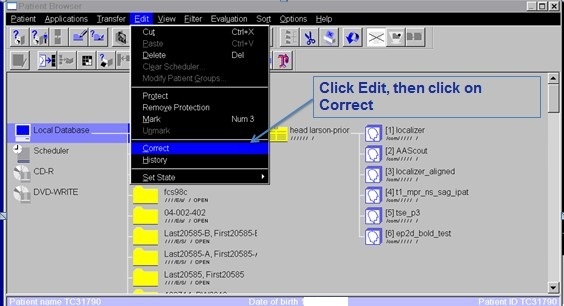
- In the Patient Browser, highlight the MR Session you wish to upload.
- Go to the Edit menu.
- Click on Correct.
In the Additional Info field, enter the following information all on one line exactly as shown below. (syntax is very important)
Example: Project:DemoProject Subject:subj001 Session:subj001_MR1
Additional Example: Project:DemoProject
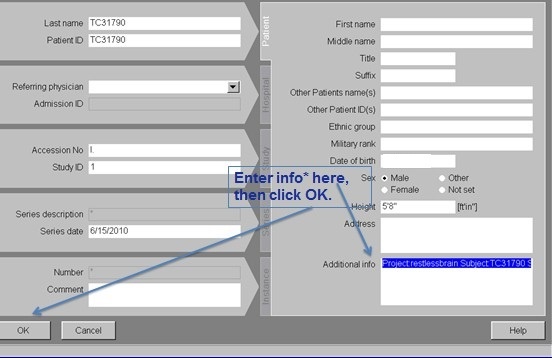
Another option would be to just add the project data and omit subject and session. Project:ProjectIDSubject:SubjectIDSession:SessionID
- Click OK.
- In the Patient Browser, select the session again.
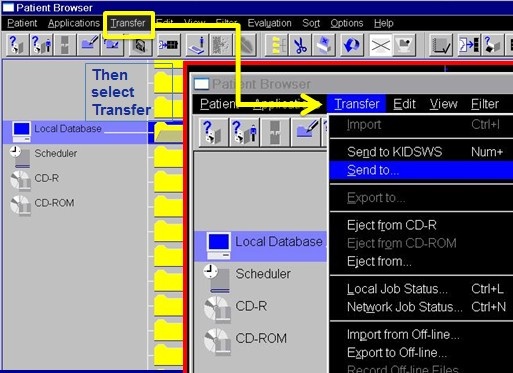
- Click on the Transfer menu.
- Click Send To.
- Select CNDA_Manual from the Send To menu.
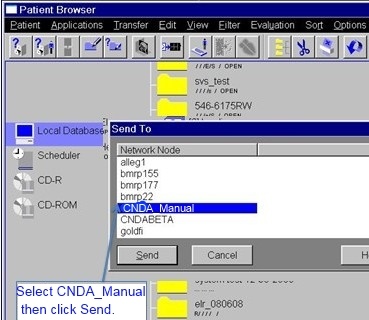
- Click Send.