
Register For a CNDA User ID
Instructions
Step 1: Open the CNDA Website
Using any web browser, go to https://cnda.wustl.edu/.
Step 2: Click the Register Link
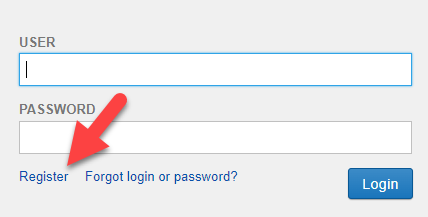
Click on the Register link located below the password field.
Step 3: Fill Out the Registration Form
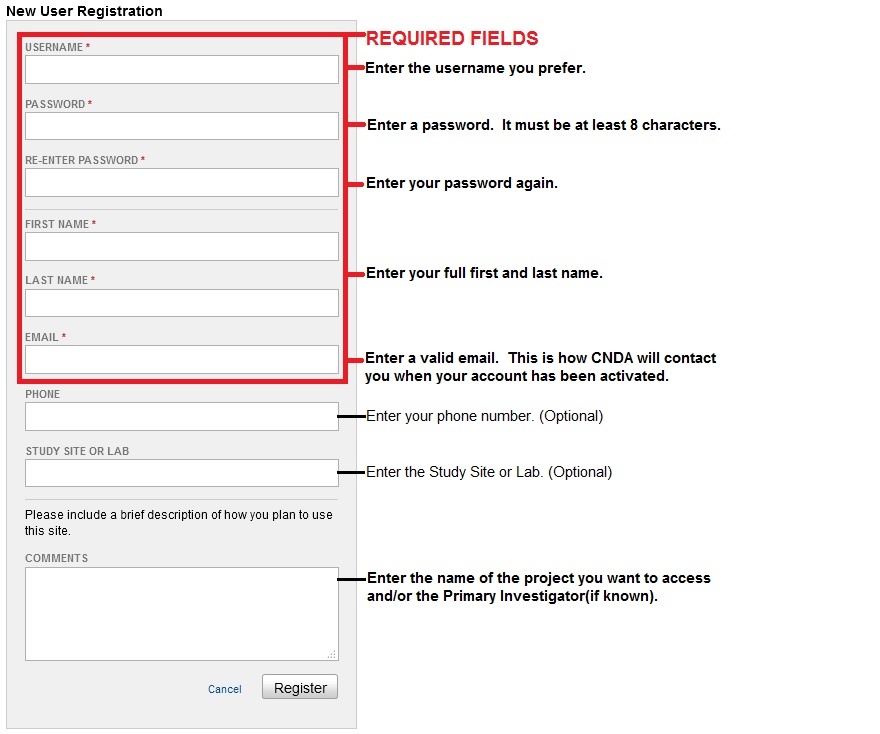
Fill out the New User Registration form that will open. Required fields are highlighted in the red box below.
Step 4: Submit Your Request
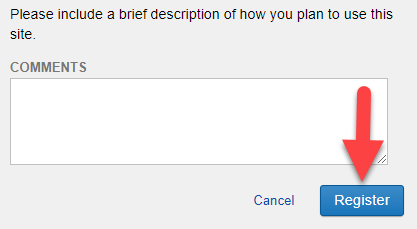
Click the Register button to submit your request.
Step 5: Check Your Email
Once registration is successful, a message will appear stating that an email verification has been sent to you. Check your email and respond to the verification email.
Step 6: Wait for Approval
Your account will be reviewed by the CNDA Help Desk. You will be notified when your account is available for use. The CNDA Help Desk may contact you for additional information before approval.